We use cookies and similar technologies to understand how our website is used and to show the booking calendar on our contact page. You can change your preferences at any time.
Stores only your choice from this notice, so we do not have to ask again on every page.
Details
scaile-consent — your choice, the time it was given and the version of this notice. Stored in your browser’s local storage, not in a cookie. Kept for 180 days, then requested again. Contains no identifier.
Analytics
Helps us understand which pages are read and where visits come from.
Details
Google Analytics 4 — Google Ireland Limited. Cookies _ga and _ga_6X7LPM6SQ8, up to 24 months. Data is processed in the USA. IP addresses are truncated before storage; Google Signals and advertising features are switched off, so no advertising profiles are built.
Rybbit — reach measurement we run ourselves on servers in Germany. No cookies, but a randomly generated identifier (rybbit-visitor-id) in your browser’s local storage, which stays until you clear it. No session recording, no form capture.
External media
Loads the booking calendar on our contact page.
Details
Cal.com — Cal.com, Inc., USA. Loading the calendar transmits your IP address, browser and device data to Cal.com and allows it to store identifiers on your device. Without this, the contact page shows a placeholder with a direct link, and you can always reach us by e-mail instead.
The scaile Sitemap Visualiser reads a website’s robots.txt and every sitemap behind it, up to 25,000 URLs, and draws the site’s structure as a cluster map in a few seconds. Free, no account, no email address.
Reading the sitemap for …
A few seconds. We’re reading your robots.txt and every sitemap behind it.
This is how AI sees your website
Sections
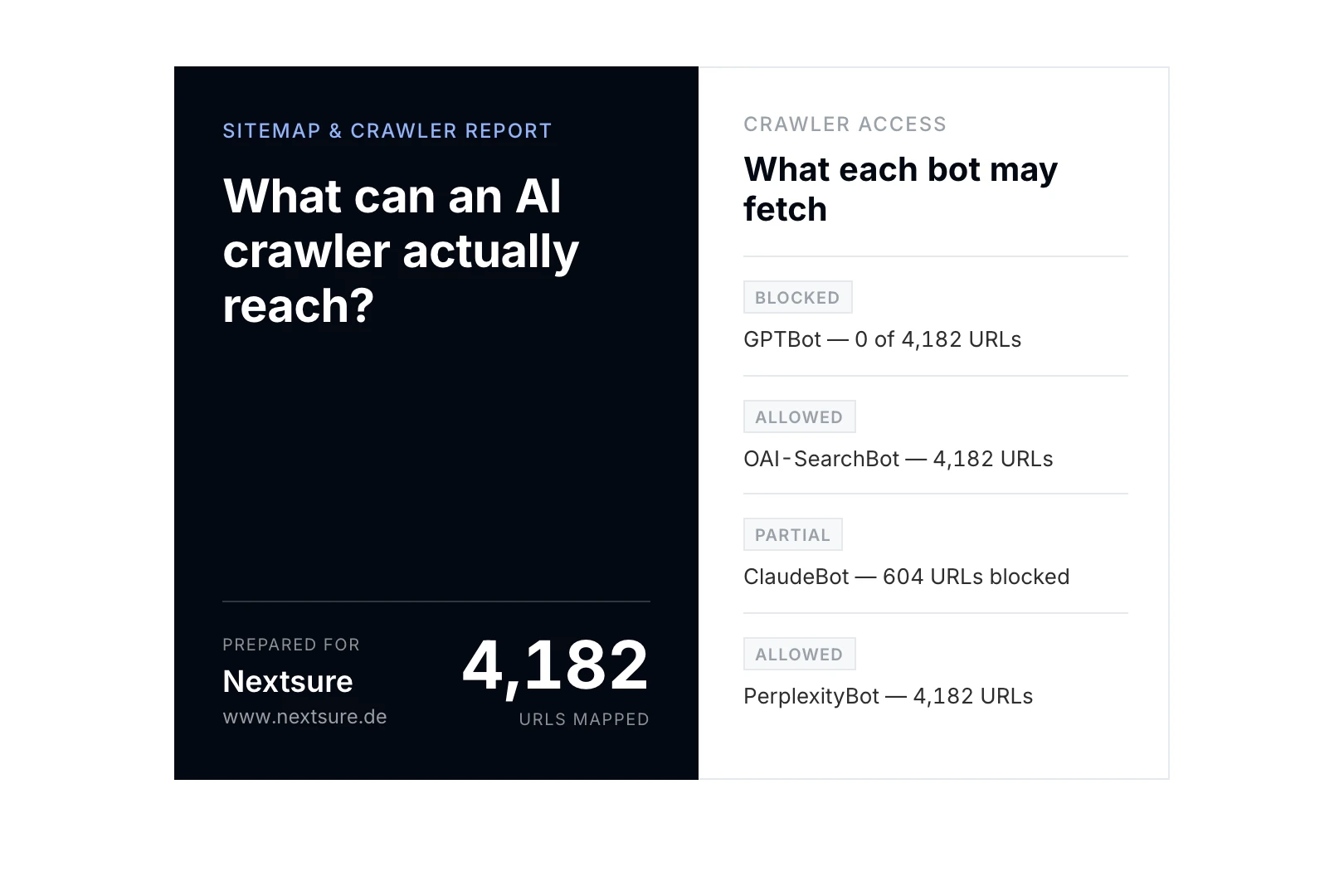
What each AI crawler is allowed to fetch
Starting the full crawl for …
One moment. We’re starting the crawl behind your report.
We’re crawling your site
The report lands in your inbox in a few minutes: these clusters, what every AI crawler is allowed to fetch, each section with its coverage, and the URLs that need attention. Want the findings walked through?
A crawl, checked against the sitemap you publish, not a reading of the file you already have.
Your structure drawn, twice
Your content clusters on this page within seconds, and the same picture as page two of the report, plus every section sized by how many URLs are in it, shaded by how many came back readable, and a profile of how far your pages sit from the homepage.
What each AI crawler can reach
Your robots.txt rules applied path by path to GPTBot, OAI-SearchBot, ClaudeBot, PerplexityBot, Google-Extended and CCBot. Blocking one of these is the quietest way to disappear from AI answers.
Where the sitemap and the site disagree
Pages you list that are gone, pages you link to that you never list, and pages with no route in from anywhere we crawled. Each one with the number of URLs it affects.
How the Sitemap Visualiser works
We read your robots.txt and every sitemap behind it (following an index to its children, including gzipped ones, up to 25,000 URLs) and draw your structure on this page. No account, no email, nothing to wait for.
From your homepage outwards along real links, up to 400 pages and five levels deep, obeying your own robots.txt rules on the way.
Your robots.txt rules applied path by path, per crawler, using the longest-match rule the real crawlers follow, so an allow inside a disallowed folder is read the way they read it.
That is the only point an email is needed, and the only point anything is crawled. The score, the map, every crawler’s access and the URLs that need attention, as a PDF in your inbox a few minutes later.
What the map reads, and what it cannot
The drawing on this page comes from files we fetched, not from a crawl. Nothing about your pages is inferred until you ask for the report.
01
What runs on this page
Your robots.txt, and every sitemap it points to, including sitemap indexes and gzipped files.
Up to 25,000 URLs, grouped into the sections you actually publish.
Which of the six AI crawlers each robots.txt rule allows, path by path.
No crawl. Nothing is requested from your pages themselves at this stage.
02
What it cannot see here
Pages you do not list in a sitemap. If your sitemap is partial, so is this drawing.
Whether a listed URL still resolves.
How pages link to one another, which is a different structure from the one a sitemap declares.
Anything on a staging or password-protected site.
03
What the full report adds
A real crawl from your homepage outwards, up to 400 pages and five levels deep.
Pages you list that are gone, and pages you link to that you never list.
Pages with no route in from anywhere we crawled.
A score with all four of its parts printed, so you can recompute it yourself.
Site structure and AI crawlers, in plain terms
What the map shows, and why the shape of a site decides how much of it gets read.
What is a sitemap visualiser?
A sitemap visualiser (also written visualizer) turns the XML sitemap a website publishes for search engines into a picture a person can read. The XML lists every URL as a flat file, which is useful to a machine and useless to anyone trying to see how a site is organised. Drawing it groups the URLs by path segment, so the sections you actually run (products, blog, support) appear as clusters sized by how many pages sit in them. What the picture is for is spotting the mismatch between the site you think you have and the one you publish.
Why does site structure matter for AI search?
An assistant answering a question does not read your whole site. It reads the pages it can reach and judges each one largely on its own. Structure decides which pages those are: a page five clicks from the homepage, in a section with no landing page above it, is reached late or not at all. Depth and section coverage are the two things this map makes visible, and they are the two that most often explain why a well-written page is never quoted.
Which AI crawlers read sitemaps, and what does blocking one cost?
Six user agents matter. GPTBot and ClaudeBot collect training data; blocking them is a real editorial choice with a real cost, but a defensible one. OAI-SearchBot and PerplexityBot fetch pages so they can be cited in an answer someone is reading right now; blocking those removes you from live answers, which is a different decision and almost never the intended one. Google-Extended governs Gemini and AI Overviews. CCBot feeds Common Crawl. The map shows all six with what each is allowed to fetch on your site.
What is a sitemap index, and why do large sites have several files?
The sitemap protocol caps a single file at 50,000 URLs and 50 MB uncompressed. Larger sites split their URLs across several sitemap files and publish a sitemap index (a sitemap of sitemaps), which is what robots.txt then points at. This tool follows an index to its children, including gzipped ones, and counts the files it read, which is worth checking: a site that publishes six sitemap files but only lists three in its index is quietly hiding half of itself.
Is a visual sitemap the same as a sitemap generator?
No, and the difference matters when choosing a tool. A sitemap generator creates the XML file you publish, usually for a site that does not have one. A visualiser reads the file you already publish and draws it. This tool is the second kind: it never writes anything to your site and never asks for access to it. If you have no sitemap at all, the drawing will be empty, and that absence is itself the finding.
Method last reviewed ·Reviewed by Simon Wilhelm, Co-Founder and CEO of scaile.
A few minutes. The crawl itself usually finishes inside a minute; the report reaches you as a PDF as soon as it is rendered.
How much of my site do you actually read?
Your sitemaps in full, up to 25,000 URLs, plus a crawl of up to 400 pages. On a site larger than that the crawl is a sample, and the report says so rather than implying it read everything: anything we could not measure properly is left out of the score instead of guessed at.
What is the score?
Four parts, weighted and printed in the report so you can recompute them: how many of the pages we requested came back readable (40%), how far the median page sits from your homepage (20%), how much of what we crawled is listed in your sitemap (20%), and how much of your site the AI crawlers are allowed to fetch (20%). No model rates anything, so the same site always gets the same score.
Can I map a competitor?
Yes. The tool works on any publicly accessible site, and it obeys that site’s robots.txt exactly as it obeys yours.
Does it work on a staging site?
No. Password-protected and staging environments cannot be crawled.
Is this the same as the Health Check?
No. The Health Check scores whether your pages are built to be cited. This one asks the question underneath it: can a crawler get to them at all, and what is there when it does.